Sebelum mengikuti langkah di bawah ini, pastikan terlebih dahulu kabel yang digunakan adalah kabel yang original.
1. Non-aktif-kan anti virus, malware, spyware, addware, dll
Langkah pertama jika anda pengguna computer ber-OS Microsoft Windows adalah dengan NON-AKTIF/disable semua anti virus, anti malware dll yang ada di computer anda. Kadang kebanyakan kasus error pada iTunes saat restore adalah karena ini.
Un-install jika perlu semua anti virusnya.
2. Restart iTunes
Cobalah terlebih dahulu untuk me-restart iTunes. Yaitu tutup (quit/exit) iTunes kemudian restart computer. Jalankan kembali iTunes, jika tidak ada masalah maka iTunes siap untuk dipakai untuk restore iPhone.
3. Pastikan versi iTunes terbaru
Update iTunes terbaru untuk ‘memuluskan’ proses restore.
4. Gunakan computer yang bersih
Jika restore tidak berhasil juga, cobalah cari computer lain yang benar-benar bersih atau yang baru di-install ulang OSnya.
5. Edit Host File
Hal sepele tapi sering membuat gagal saat proses restore
6. Copot semua USB tidak terpakai yang terhubung dengan komputer.
7. Masalah Batere
Copot batere dari iPhone dan biarkan selama 10 menit iPhone tanpa batere. Kemudian pasang kembali batere dan lanjutkan dengan proses restore.
09 Januari 2016

25 Desember 2015
Solusi iTunes Error 48 Ketika Restore iPhone
Ketika kita akan me-restore atau update ke versi iOS lebih tinggi dan menghadapi notifikasi error dari iTunes dengan kode 48 (sebut: error dua angka) kemungkinan masalah ada di hardware atau di software. Biar gak panic, lebih baik kita asumsikan dulu sebagai error software.

Ini adalah beberapa langkah solusi error 48 (hampir sama error 29):
1. Non-aktif-kan anti virus, malware, spyware, addware, dll Langkah pertama jika anda pengguna computer ber-OS Microsoft Windows adalah dengan NON-AKTIF/disable semua anti virus, anti malware dll yang ada di computer anda. Kadang kebanyakan kasus error pada iTunes saat restore adalah karena ini. Un-install jika perlu semua anti virusnya.
2. Pastikan versi iTunes terbaru Update iTunes terbaru untuk ‘memuluskan’ proses restore.
3. Gunakan computer yang bersih Jika restore tidak berhasil juga, cobalah cari computer lain yang benar-benar bersih atau yang baru di-install ulang OSnya.
4. Non-aktif-kan Passcode Non-aktif-kan passcode yang terpasang.
5. Masalah Batere Rata-rata kasus error 48 adalah karena batere. Ya, mungkin habis ganti batere baru atau karena sering copot batere karena iPhone sering dibongkar. Kualitas batere pengganti yang jelek kemungkinan akan muncul pesan error ini juga. Usahakan ganti dengan batere kualitas bagus atau dengan batere original.
6. Factory Reset Jika semua langkah di atas tidak berhasil, coba langkah terakhir ini….. Reset iPhone anda sebelum restore. Settings > General > Reset > Erase All Content and Settings.
"The iPhone could not be restored. An unknown error occurred (48)”

Ini adalah beberapa langkah solusi error 48 (hampir sama error 29):
1. Non-aktif-kan anti virus, malware, spyware, addware, dll Langkah pertama jika anda pengguna computer ber-OS Microsoft Windows adalah dengan NON-AKTIF/disable semua anti virus, anti malware dll yang ada di computer anda. Kadang kebanyakan kasus error pada iTunes saat restore adalah karena ini. Un-install jika perlu semua anti virusnya.
2. Pastikan versi iTunes terbaru Update iTunes terbaru untuk ‘memuluskan’ proses restore.
3. Gunakan computer yang bersih Jika restore tidak berhasil juga, cobalah cari computer lain yang benar-benar bersih atau yang baru di-install ulang OSnya.
4. Non-aktif-kan Passcode Non-aktif-kan passcode yang terpasang.
5. Masalah Batere Rata-rata kasus error 48 adalah karena batere. Ya, mungkin habis ganti batere baru atau karena sering copot batere karena iPhone sering dibongkar. Kualitas batere pengganti yang jelek kemungkinan akan muncul pesan error ini juga. Usahakan ganti dengan batere kualitas bagus atau dengan batere original.
6. Factory Reset Jika semua langkah di atas tidak berhasil, coba langkah terakhir ini….. Reset iPhone anda sebelum restore. Settings > General > Reset > Erase All Content and Settings.
09 September 2013
eBook Gratis. iLmu iDevice - Edisi 2 - Semua Tentang iDevice USB Cable
eBook Gratis. iLmu iDevice - Edisi 2 - Semua Tentang iDevice USB Cable


Judul: Semua Tentang iDevice USB Cable
Penerbit: iLmu iDevice
Edisi: 3 Tahun 2013
Format: .PDF
Penulis: Budiman Rubia Viqih aka bugeMac
Penyunting: bugeMac
Design Cover: Stroke.Keyboard
Design and Layout: Stroke.Keyboard
Isi:
- 30-pin to USB cable Yang Pernah Apple Buat
- Lightning to USB Cable
- Jika iDevice Menggunakan Lightning Palsu
- Cara Melindungi kable iDevice (iPhone, iPad, iPod) yang terkelupas
- Kabel iDevice (iPhone, iPad, iPod) Premium dari Pihak Ketiga.
- Ciri-ciri 30-pin toUSB Cable Asli
-
eBook Gratis. iLmu iDevice - Semua Tentang Apple Earbuds.
eBook Gratis. iLmu iDevice - Edisi 3 - Semua Tentang Apple Earbuds.
.jpg)
Judul: Semua Tentang Apple Earbuds
Penerbit: iLmu iDevice
Edisi: 3 Tahun 2013
Format: .PDF
Penulis: Budiman Rubia Viqih aka bugeMac
Penyunting: bugeMac
Design Cover: Stroke.Keyboard
Design and Layout: Stroke.Keyboard
Isi:
- Macam-macam Apple Earbuds (Macam-macam Apple Earphone)
- Ciri-ciri Earpod Asli
- Biodegradable Earpod Holder
- Fungsi Remote di Apple Earphone
- Membuat Sendiri Earphone Holder
- Macam-macam Earphone Holder
- Masalah suara di iPhone
download:
link 1 download
14 Januari 2013
Cara hapus semua Contacts, daftar nomor telpon di iPhone
Ini cara menghapus daftar kontak / Contacts di iPhone tanpa bantuan aplikasi lain:
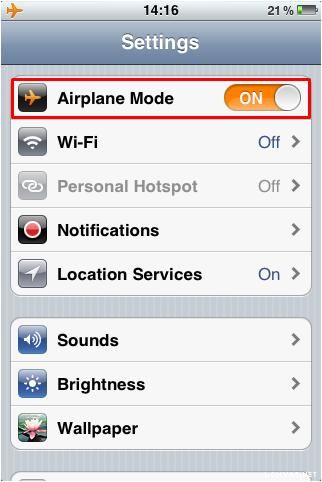
- Tidak membutuhkan internet, selular maupun wifi
- Tidak membutuhkan software lain
- Tidak membutuhkan iTunes
- Tidak butuh Cydia
- Hnya butuh waktu kurang dari 5 menit.
12 Januari 2013
Cara membedakan iPhone asli dan iPhone palsu
Karena di pasaran banyak yg beredar ponsel dan smartphone mirip2 iPhone, bahkan ada yg benar-benar mirip dari tampilan fisik maupun tampilan OS maka perlu diketahui cara membedakan iPhone palsu (fake) dan iPhone asli (real)agar tidak tertipu dngn iPhone palsu.
Cara 1:
Jika menggunakan komputer PC atau Mac sangat mudah untuk mengenal iPhone asli beserta modelnya. Kita dapat menggunakan Software 'wajib' untuk pengguna iPhone yaitu iTunes. iTunes dapat didownload dari webnya yaitu http://www.itunes.com
- Setelah iPhone dihubungkan ke komputer maka iTunes akan mendeteksi secara lengkap, mulai dari model iPhone, besar kapasitas penyimpanan, warna, Serial Number, dll. Jika palsu tentung tidak akan terdeteksi sama sekali!
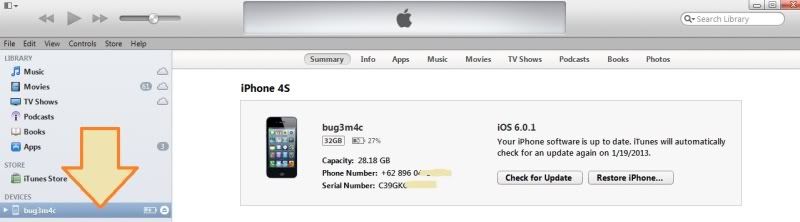
.
Cara 1:
Jika menggunakan komputer PC atau Mac sangat mudah untuk mengenal iPhone asli beserta modelnya. Kita dapat menggunakan Software 'wajib' untuk pengguna iPhone yaitu iTunes. iTunes dapat didownload dari webnya yaitu http://www.itunes.com
- Setelah iPhone dihubungkan ke komputer maka iTunes akan mendeteksi secara lengkap, mulai dari model iPhone, besar kapasitas penyimpanan, warna, Serial Number, dll. Jika palsu tentung tidak akan terdeteksi sama sekali!
.
10 Januari 2013
Pengertian Jailbreak, Jailbreak Tethered dan Jailbreak Untethered
Cuma mengulang artikel 2-3 tahun lalu di blog ini, tentang perngertian jailbreak dan jenis-jenis jailbreak.
Jailbreak
Dari pabriknya iDevice (iPhone, iPad, iPod) sudah diproteksi, baik sistem maupun hardware (data penyimpanan)agar si pengguna tidak dapat mengotrak-atik dalamnya iDevice. Jailbreak adalah proses membuka proteksi tersebut sehingga kita dapat mengeksplor sistem dan hardwarenya. Kita dapat mengakses, memodifikasi, dan menambah dari sistem yang ada. Dengan demikian kita dapat memasukan tweak, utilitas, themes untuk iPhone. Bahkan kita dapat menginstall aplikasi yg bukan dari iTunes APple Store.
Jenis Jailbreak
Ada 3 jenis jailbreak yg dikenal, yaitu jailbreak Tethered, semi-untethered dan jailbreak Untethered.
Tool Jailbreak
Untuk melakukan jailbreak, kita membutuhkan tool/software (untuk Windows ataupun Mac OS) untuk prosesnya . Tool ini biasanya dirilis oleh para hacker dan software iphone developer. Tool jailbreak mempunyai versi yg dapat digunakan untuk iOS/firmware iPHone tertentu.
Tool jailbreak diantaranya:
Jailbreak
Dari pabriknya iDevice (iPhone, iPad, iPod) sudah diproteksi, baik sistem maupun hardware (data penyimpanan)agar si pengguna tidak dapat mengotrak-atik dalamnya iDevice. Jailbreak adalah proses membuka proteksi tersebut sehingga kita dapat mengeksplor sistem dan hardwarenya. Kita dapat mengakses, memodifikasi, dan menambah dari sistem yang ada. Dengan demikian kita dapat memasukan tweak, utilitas, themes untuk iPhone. Bahkan kita dapat menginstall aplikasi yg bukan dari iTunes APple Store.
Jenis Jailbreak
Ada 3 jenis jailbreak yg dikenal, yaitu jailbreak Tethered, semi-untethered dan jailbreak Untethered.
- Jailbreak tethered, iPhone kita membutuhkan toolsnya kembali untuk melakukan booting/restart.
- Jailbreak tethered, iPhone kita membutuhkan toolsnya kembali agar iPhone tetap terjailbreak
- Jailbreak untethered, adalah jailbreak sempurna sebab tidak membutuhkan toolsnya lagi. Sekali jailbreak iPhone tetap terjailbreak walau direstart, power off. Kita tidak membutuhkan tool redsn0w untuk menghidupkan iPhonenya.
- Jailbreak semi-untethered, iPHone akan tetap terjailbreak tapi ada beberpa fitur dan aplikasi tidak dapat bisa berjalan.
Tool Jailbreak
Untuk melakukan jailbreak, kita membutuhkan tool/software (untuk Windows ataupun Mac OS) untuk prosesnya . Tool ini biasanya dirilis oleh para hacker dan software iphone developer. Tool jailbreak mempunyai versi yg dapat digunakan untuk iOS/firmware iPHone tertentu.
Tool jailbreak diantaranya:
- Spirit
- Jailbreakme.com
- Limera1n
- Pwnage Tool
- sn0wbreeze
- redsn0w : tool ini yg sering dipakai sampai saat ini.
- greenpois0n
Cara Unlock iPhone 3Gs, iPhone 4 di iOS 6.0.1
iPhone yang perlu di-unlock adalah iPhone yang berjenis iPhone SU (Software Unlock), sedangkan untuk iPhone FU (Factory Unlock) tidak membutuhkan proses unlcoking ini. Untuk mengetahui berbedaan iPhone SU dan FU harap searching di blog ini sbb saya sudah membahasnya.
Cara mudah iPhone kita berasal dari mana dan termasuk SU (locked) atau FU (unlocked) dapat dicek di http://www.iphonefrom.com dengan cara memasukan model iPhone. Buka Settings> General> About> Model. Masukan kode MOdel di web iPhone from.
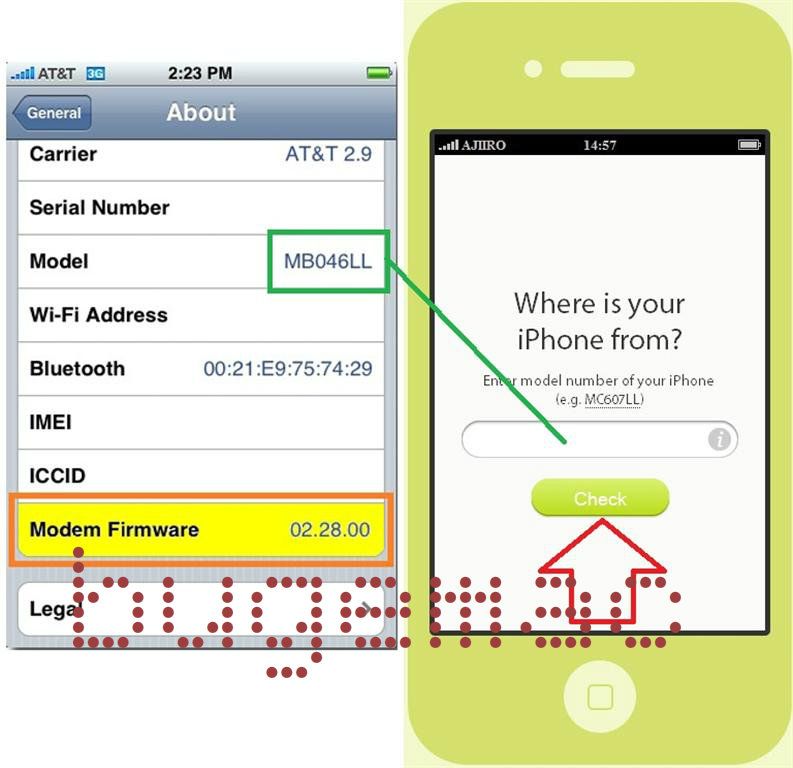
Unlock iPhone 3Gs, iPhone 4 di iOS 6.0.1 hanya dapat dilakukan yang mempunyai baseband, modem firmware sebagai berikut:
01.59.00
04.26.08
05.11.07
05.13.01
05.12.01
06.15.00
Cara mengetahui baseband/iphone modem firmware, buka Settings> General> About> Modem Firmware :
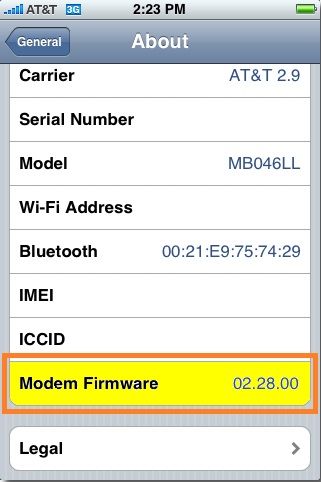
Syarat:
- sudah dijailbreak
- cydia sudah terinstall
- install Ultrasn0w dan Ultrasn0w Fixer
Cara Unlock iPhone 4 dan iPhone 3GS iOS 6.0.1:
Cara mudah iPhone kita berasal dari mana dan termasuk SU (locked) atau FU (unlocked) dapat dicek di http://www.iphonefrom.com dengan cara memasukan model iPhone. Buka Settings> General> About> Model. Masukan kode MOdel di web iPhone from.

Unlock iPhone 3Gs, iPhone 4 di iOS 6.0.1 hanya dapat dilakukan yang mempunyai baseband, modem firmware sebagai berikut:
01.59.00
04.26.08
05.11.07
05.13.01
05.12.01
06.15.00
Cara mengetahui baseband/iphone modem firmware, buka Settings> General> About> Modem Firmware :
Syarat:
- sudah dijailbreak
- cydia sudah terinstall
- install Ultrasn0w dan Ultrasn0w Fixer
Cara Unlock iPhone 4 dan iPhone 3GS iOS 6.0.1:
- Buka Cydia di iPhone yang sudah dijailbreak tentunya
- Masuk ke Manage> Sources> Edit> Add dan tambahkan web repo ini repo: http://repo.iparelhos.com
- Cydia akan respring.
- Cari “Ultrasn0w” dan install.
- Setelah Ultrasn0w terinstall, cari “Ultrasn0w Fixer” dan install juga.
Langganan:
Postingan (Atom)